![01_Outcomes_circle_r_FINAL_300dpi-01.png]](https://outcomes.com/hs-fs/hubfs/01_Outcomes_circle_r_FINAL_300dpi-01.png?height=40&name=01_Outcomes_circle_r_FINAL_300dpi-01.png)
Introduction: What is PRISM?
PRISM is a prescribing tool that provides pharmacists with decision support and patients with free access to pre-evaluation screenings that help to identify which forms of contraception and smoking cessation options are appropriate for them to be prescribed. It can also serve as a clinical Electronic Health Records (EHR) system that pharmacies can then use to prescribe these recommended therapies.
Connection: How does it fit with Outcomes?
Together, Outcomes and PRISM have established a partnership that will allow Outcomes Premium customers to add these new products as a separate prescribing workflow. This means that the PRISM Platform will run alongside Outcomes Premium while the Clinical, Vaccine, Opportunities, and Engagement modules retain their same exact functionality. Interested customers will be able to subscribe by directly clicking on a link located within the Outcomes Premium Menu at the cost of $89.00 per month per location. Implementation takes less than one week from a signed contract to the first prescription being filled and onboarding includes pharmacist training, license verification, Surescripts enrollment and protocol activation for your state.
Adoption: Who is eligible to subscribe?
All current Outcomes Premium customers are eligible to subscribe to the PRISM Platform. However, it is important to note that there are exceptions when it comes to eligibility as Continuing Medication Education (CME) and Certificate requirements for these types of prescriptions can vary from state to state. As of August 2026, the PRISM Platform is only supported in 25 states where pharmacists are authorized to prescribe (see chart below).
|
California |
Maine |
New Mexico |
|
Colorado |
Massachusetts |
New York |
|
Connecticut |
Michigan |
North Carolina |
|
Delaware |
Minnesota |
Oregon |
|
Hawaii |
Montana |
Rhode Island |
|
Idaho |
Nevada |
South Carolina |
|
Illinois |
New Hampshire |
Utah |
|
Indiana |
Vermont |
Virginia |
|
Iowa |
|
|
Implementation Process
- Subscription Process
Outcomes Premium users can subscribe to PRISM by following the series of steps outlined below. After the account creation process, users will then begin the onboarding process, which includes receiving detailed training resources.
Subscription Process Steps
-
- Navigate to the Outcomes Platform by opening a web browser (e.g., Google Chrome or Microsoft Edge) and accessing the URL provided below:
URL: https://www.outcomes.com
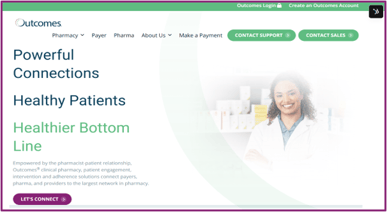
- Click on the Outcomes Login option in the upper righthand corner of the screen. A new tab will open in your browser that displays the Outcomes Login screen as shown below:
- Navigate to the Outcomes Platform by opening a web browser (e.g., Google Chrome or Microsoft Edge) and accessing the URL provided below:
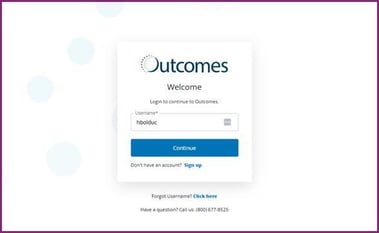
3. Enter your Outcomes Platform username in the Username textbox. Then, click on the Continue button.
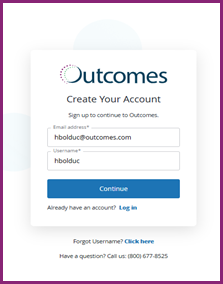
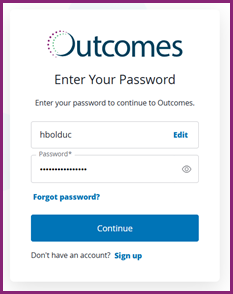
4. Enter your Outcomes Platform password in the Password textbox. Then, click on the Continue button.
NOTE: Click on the Forgot Password? link if a password reset is needed.
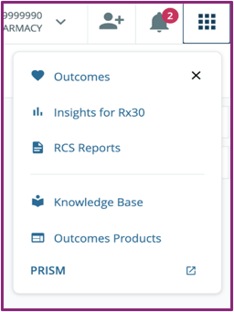
5. From the Home Page, click on the Menu option (Square of Squares Icon) in the upper righthand corner of the screen. Then, select the PRISM option.
6. A new page will open displaying the PRISM Platform Website as shown below.
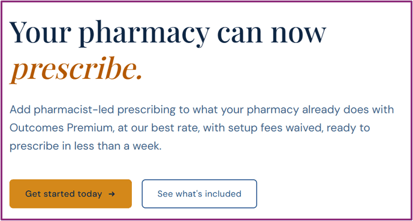
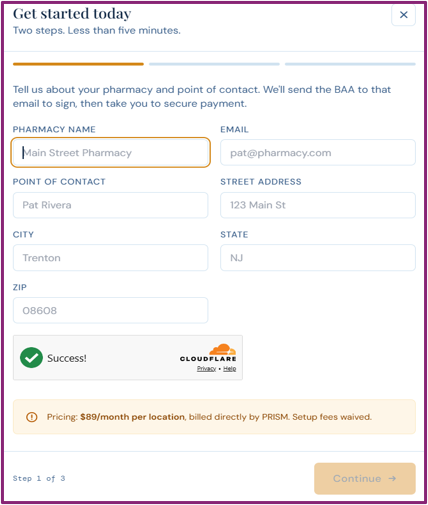
7. Once the Get Started Today window pops up, fill out each of the pharmacy details using the textboxes below:
-
-
-
-
Pharmacy Name
- Point of Contact
- Street Address
- City
- State
- Zip
-
-
-
-
- 8. Select the Continue button.
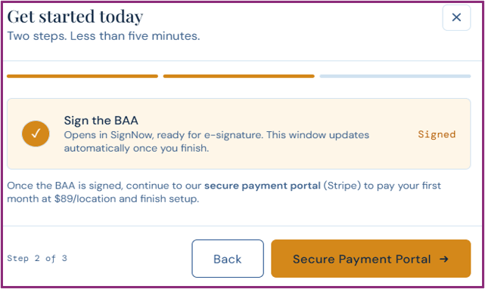
- 9. From the next screen, click on the Open SignNow button and e-sign the Business Associate Agreement (BAA).
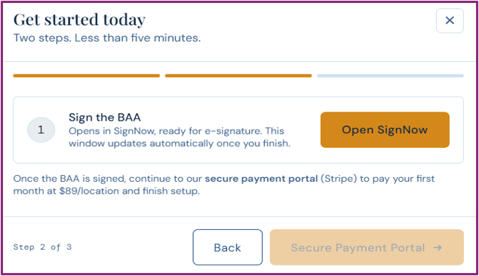
- 10. Then, click on the Secure Payment Portal button to input your selected payment method for PRISM and make your first payment using the Stripe Payment Portal.
- 11. Select the Subscribe button.
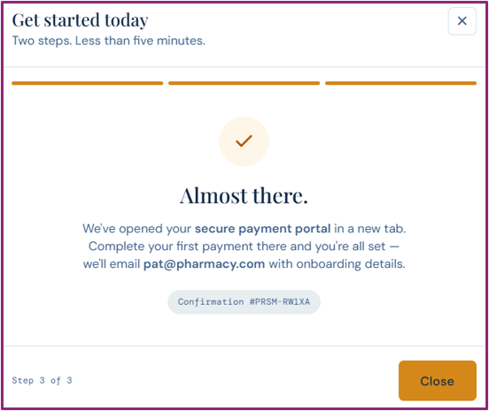
- 12. Verify that the Almost There message displays as shown below and take note of your unique confirmation number.
- 13. Select the Close button.
- 8. Select the Continue button.
- II. Onboarding Process
-
After subscribing to PRISM, users will then begin the onboarding process. Training resources will be directly sent to the e-mail address on file and include a series of self-paced training modules as well as the opportunity to participate in live demonstrations on the topics of either commercialization, clinical care, or pharmacy technology. Please refer to the additional resources section of this article for more information.
-

Additional Resources
- Websites
These two websites listed below provide direct access to key PRISM resources, including the PRISM platform login page and the Outcomes subscription page for customers who want to add PRISM to their Outcomes Premium workflow.
-
-
- PRISM Website: https://login.myprismrx.com/
- Outcomes Subscription Website: https://www.getprismrx.com/outcomes
-
-
- FAQ Guide
This FAQ Guide features 10 commonly asked questions and answers related to PRISM subscription eligibility, implementation, onboarding, and ongoing support. It can be used as a quick reference to help users better understand how the clinical solution works alongside the Outcomes Premium workflow.
- One Pager
This One Pager provides a high-level overview of PRISM product costs, key features, customer benefits, and the value of adding the prescribing workflow to Outcomes Premium. It is designed to give customers and internal teams a concise summary of the solution before moving forward with subscription or implementation.
- Training Resources
These Training Resources provide users with self-paced learning materials related to the topics of completing pharmacy setup, managing patient records, configuring admin settings, and completing patient encounters. They are intended to support pharmacists and pharmacy teams as they prepare to use PRISM effectively after subscribing.